Introduction to Privacy
This guide borrows its vocabulary from "An Introduction to Privacy Theory," which describes two types of actors: agents (beings with something to keep private) and zalgos (platforms and institutions that affect your privacy while having none of their own). For example, Google doesn't have anything private you can observe or disturb; i.e. it has no privacy of its own, but it affects yours. Painted properties are non-self-assigned attributes that zalgos typically stamp onto you to track you. Any information provided by zalgos, such as your web browser (e.g. what browser and version you're using, what your monitor resolution is, your time zone), your IP address, and other characteristics, gives other zalgos just enough identifying information to create a unique fingerprint of who you are. In some cases, such as when using a desktop application, certain websites, or even an operating system like Windows, you get fingerprinted directly through the software's telemetry. Other times, the software or service simply requires you to register an account, at which point you've handed over identifying information yourself. Some of what you reveal is chosen: how much information you give to other agents is part of the language game. However, limiting your exposure to zalgos is universally applicable. You can do this by lessening your unnecessary paint, then making the remaining properties hard to correlate, with the endgame being to compartmentalize identities and reduce correlation between them. Everyone has limits on how much time and convenience they're willing to sacrifice for privacy, so this guide establishes different paint reduction levels while keeping multiple threat models in mind. Perfect privacy doesn't exist, but this isn't an issue, as perfect privacy is not lived privacy. Privacy is not the elimination of paint, but the management of it. The objective is to ensure that those traces are limited, compartmentalized, and aligned with your threat model. If you wanted to be invisible, you wouldn't use the internet. The goal is to be in control of which zalgos are permitted to see which parts of you.
Why Privacy Is Important
A common response to any discussion about privacy is "I have nothing to hide," or "Why would anyone care about spying on me?" Claiming that you have "nothing to hide" assumes that privacy is only useful for concealing wrongdoing. It's similar to people saying, "Why would I need a lawyer if I haven't committed any crimes?" Most people wouldn't share something like their browsing history and all their accounts with a stranger, but is a faceless corporation that is actively exploiting them not a stranger? Even if you truly have nothing to hide today, the standard for what's considered acceptable changes over time; data collected about you now doesn't disappear when that standard shifts, and can end up being judged by a completely different set of rules than the ones it was collected under. The second objection, "why would anyone care about me specifically?", misunderstands who's actually doing the watching, and why. Even if you aren't being surveilled individually, the infrastructure surveils everyone indiscriminately by default; zalgos profit from aggregating data at scale, not from any particular interest in you. You don't need to be interesting to be profiled; you only need to exist within their reach.
Who Each Level Is For
Each level is structured based on how much convenience you're willing to trade for privacy. That being said, some defined threat models might correspond to a specific level.
- Level 1: Anyone with an internet connection.
- Level 2: Anyone who wants to meaningfully reduce cross-service tracking and is willing to spend a day or less setting things up.
- Level 3: People who want to stop accounts themselves from being the correlating thread across their online activity by switching to open-source front-ends for existing services.
- Level 4: People who don't just want to reduce tracking but want to stop trusting closed-source software and platforms entirely, and are willing to migrate their OS and daily apps to audited, libre alternatives.
- Level 5: People willing to apply the same open-source philosophy to their phone and firmware, and are willing to pay to improve their privacy.
- Level 6: People who want anonymity to be the default state of their system, willing to route all traffic through anonymity networks and compartmentalize their computing, even at a real cost to speed and convenience.
- Level 7: People who need to protect against threats that have full lawful access to all types of digital infrastructure, or with physical access to their devices or person, e.g. device seizure, forensic search, or physical tracking, rather than purely remote/digital threats.
Level 0: The Passive Agent
Level 0 describes an agent who isn't playing the privacy game at all. They are not even aware that paint is being applied to them. Their practices include but are not limited to:
- Permitting third-party cookies.
- Using single sign-on to log in with Google, Apple, or Facebook on third-party services.
- Using the same email across every account tied to their real name.
- Never opting out of targeted advertisements.
- Never disabling telemetry on any software.
Every zalgo that touches this agent can easily link them to every other zalgo that's touched them.
Level 1: Low-Inconvenience Paint Reduction
Level 1 is removing paint that serves no purpose for you, disabling default settings that only serve to benefit the zalgos, or reducing the amount of contact you have with zalgos, at no cost to your convenience.
Disabling Windows telemetry & data collection (walkthrough)
The settings in this walkthrough primarily reduce optional diagnostics, personalization, recommendations, and associated account data. Windows can still track you. The best thing for your privacy is to just not use Windows, but that comes at the cost of convenience, which will be explored at higher paint-reduction levels.
First, we're going to disable "sending optional diagnostic data." Now, open your Settings app and navigate to the "Privacy & security" settings:
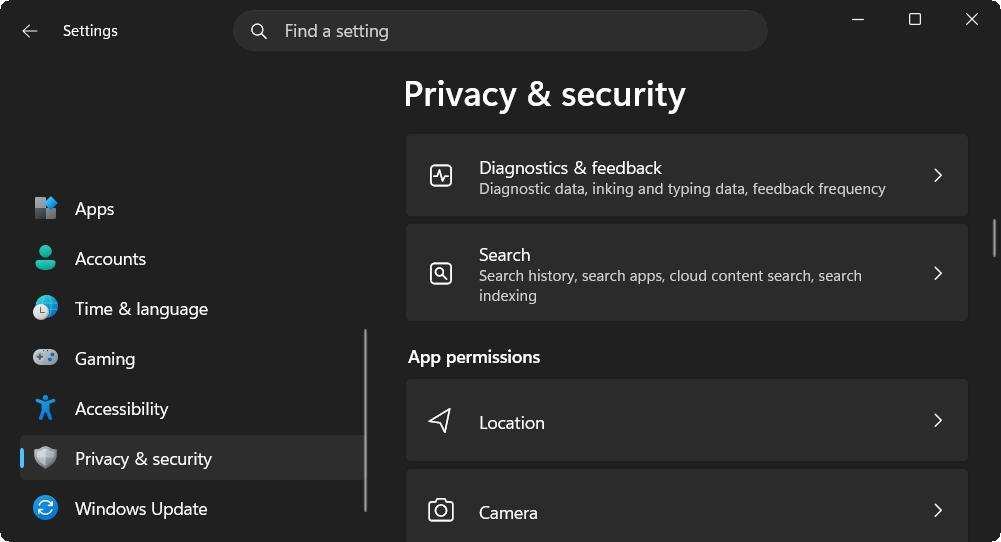
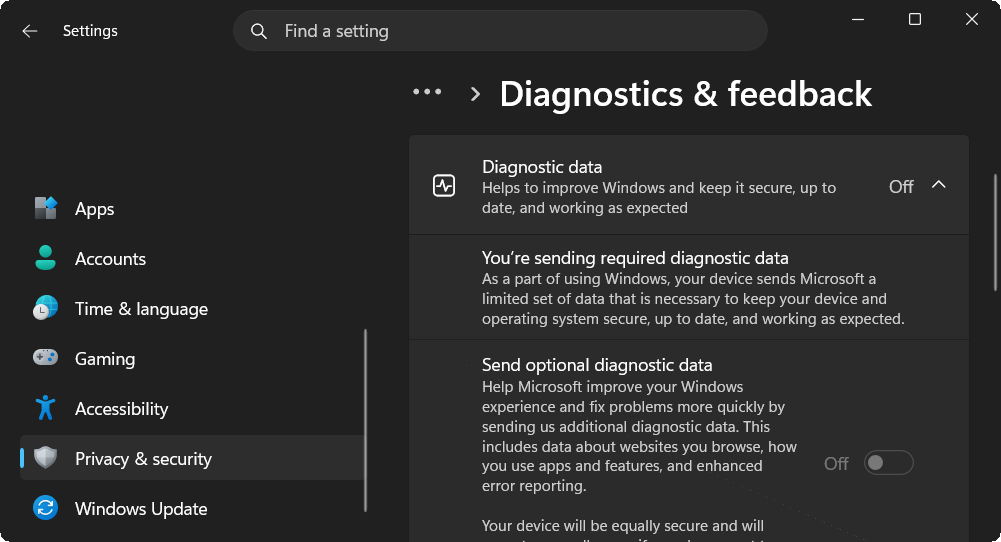
Once you're here, scroll to "Diagnostics & feedback" and click on it; scroll down to "Diagnostics data" and open it. Then, disable "Send optional diagnostic data":
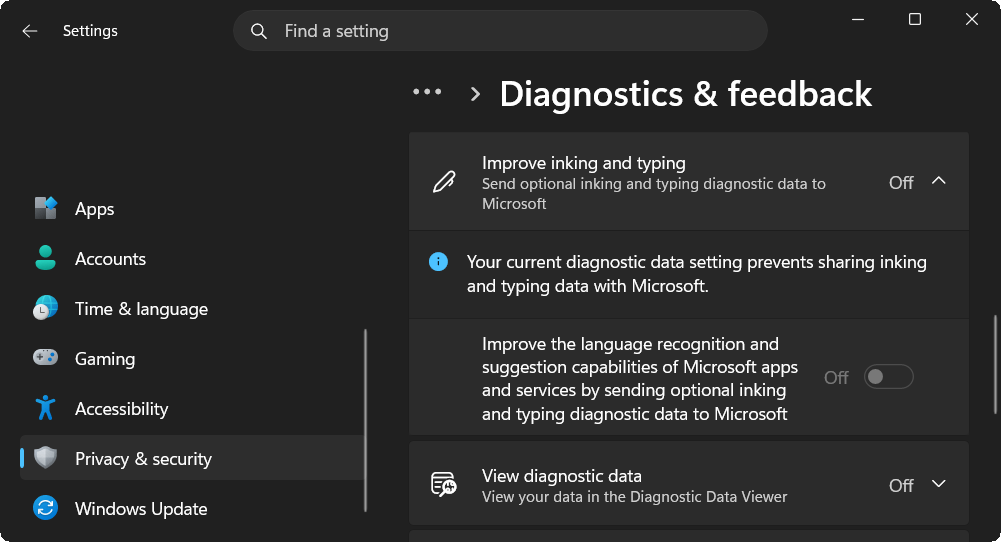
Now scroll down to "Improve inking and typing" and open that too. Microsoft collects samples of the content you type to improve autocompletion, spelling correction, etc. Now, Microsoft does claim that "it gets anonymized" and that it isn't used for "tailored experiences," but blindly trusting Microsoft with what you type on your keyboard, in exchange for no direct benefit to you, is bad for your privacy. Make sure to disable this.
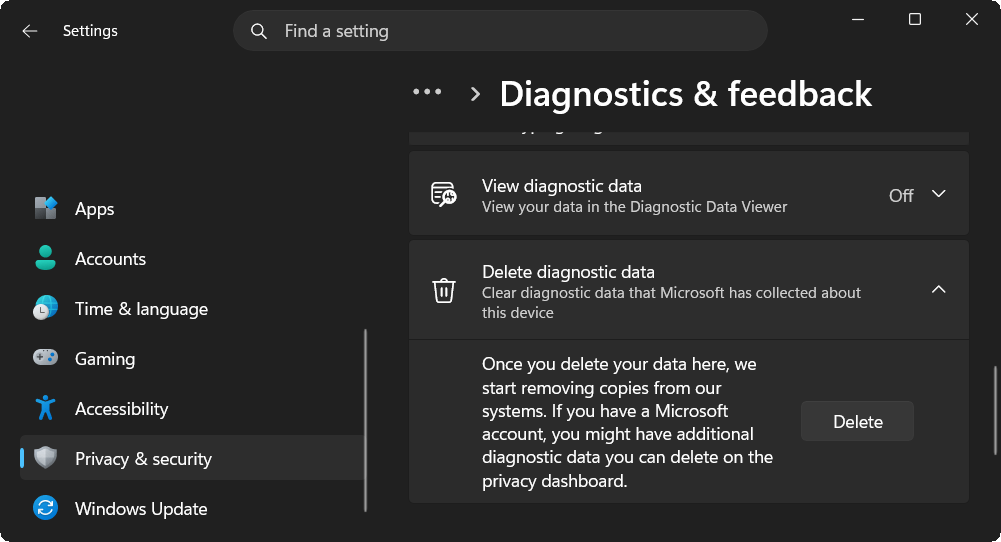
Then go down further, and delete the existing diagnostic data Microsoft has collected from you:
Return to the "Privacy & security" page and scroll down to "Recommendations & offers," then open that:
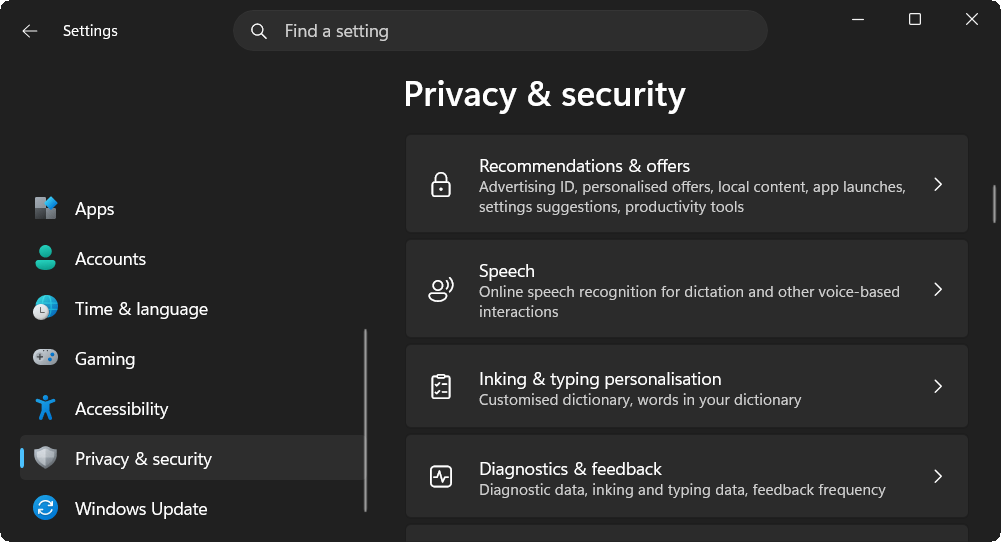
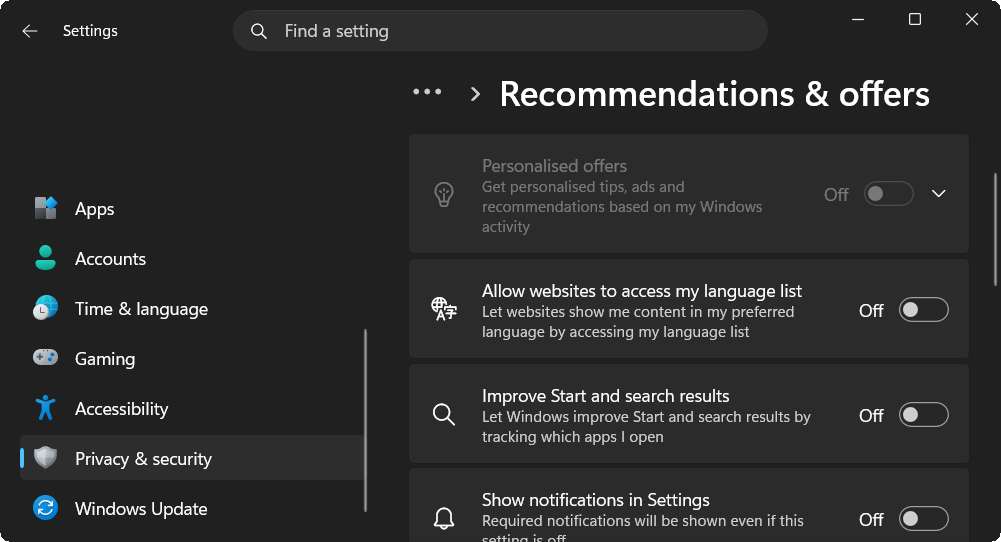
Then, set everything to off. Make sure you scroll down as you disable everything, as there are more:
There is also another place you have to disable personalized ads and delete data Microsoft has on you. Navigate in your internet browser to account.microsoft.com/privacy. The first thing you'll notice is the "Empower your productivity" section. Go through this section thoroughly and delete things such as your search history, disable search and news personalization, and more. However, you're also going to want to scroll down to "Manage ads and promotional communications" and click on "Personalized ad settings."
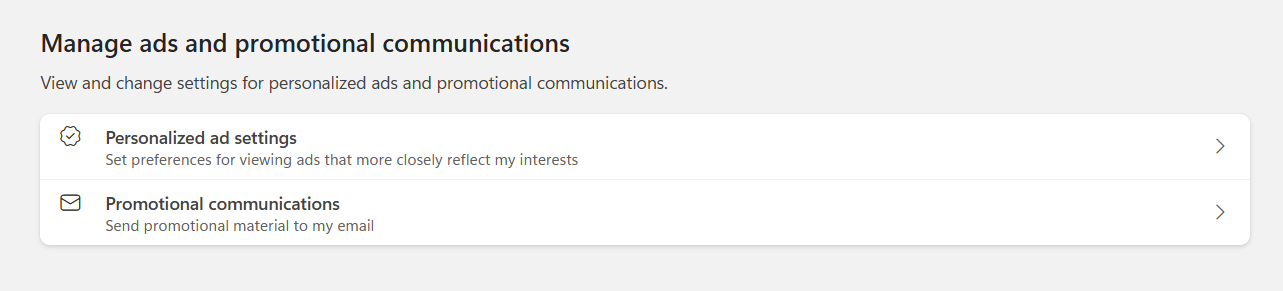
Make sure you disable "See ads and offers that interest you."
Protecting your internet browser
As mentioned in the introduction, your browser itself is a zalgo. Every characteristic that is unique to your browser and hardware setup, combined, creates a unique fingerprint for your browser. Using Incognito Mode, for example, does not prevent a website from tracking you, as it can still tell, from all the miscellaneous details your browser sends it, that you are likely the same browser associated with your real identity. Another example is that a website can deanonymize you even if you use a VPN: even though your IP address is changed, the website may still correlate the session with earlier activity. Most common browsers do little or nothing to protect you against tracking on the web. While changing your browser might temporarily cost you some convenience, as you need to import all your previous data, it is definitely worth doing if your browser isn't protecting you.
Before looking at the list of my suggested browsers, check first to see how much your browser already does to protect you against tracking. I recommend going on EFF's Cover Your Tracks index to test your browser. If it has anything lower than "strong protection against web tracking" and doesn't have a randomized fingerprint, it probably shouldn't be used. For example, I tested Google Chrome, Firefox, and Safari on the same device with standard privacy settings. In my testing, Chrome had a completely unique fingerprint with nothing to prevent tracking. Firefox provided partial protection against some known trackers, but still had a unique fingerprint. Safari had strong protection. Out of the three browsers, the only one that I would stick with is Safari, but that doesn't mean I would switch from Chrome to Safari. If your browser already provides strong protection against web tracking, stick with it. You're better off in an environment you're familiar with that already protects you. If you need to change your browser, I'd recommend trying out one from the following:
- Mullvad Browser: Provides some of the strongest privacy options by default. If you're browsing on a computer, I would recommend this browser above all. As of the time of writing this, however, it doesn't have a mobile app. Installing unusual extensions or changing fingerprint-relevant settings can make the browser more distinctive, so I recommend leaving its defaults unchanged.
- Brave: Provides strong privacy options by default. Works on all devices. Not something I would personally use (due to past controversies), but if you're switching away from a browser like Chrome, it will be very easy to adapt to using it.
- Safari: If you use an Apple product, Safari has strong privacy options by default while also being one of the best integrated browsers for that ecosystem.
Along with this, you should change your search engine to one that's privacy-respecting:
There are other browsers that I didn't include that are known for their privacy features, such as LibreWolf. I'm not saying those are bad browsers, but based on my testing, they all had unique fingerprints on my devices. If you do wish to use a browser not listed, that's perfectly fine; just make sure you verify for yourself that your browser isn't deanonymizing you.
Last technically reviewed: July 2026.
There are still more parts that you have to do on your own; these are not difficult and don't affect your convenience:
- Use DNS over HTTPS. Each device has its own DNS settings, but I would recommend using Cloudflare's 1.1.1.1 or Quad9's 9.9.9.9. Encrypted DNS shifts trust for DNS resolution from the local network or ISP to a resolver that you get to choose.
- Google, Meta, Amazon, TikTok, Snapchat, and more all have their own advertising IDs, which are used by their own and other apps. Go through each platform and network you use and make sure you disable advertising IDs in their settings. You should also disable ad tracking on your phone, whether it is on iOS or Android.
- Disable telemetry and other data collection on other operating systems you use. This includes your phone.
Level 2: Setting Up for the Long Term
Unlike Level 1, Level 2 requires some upfront effort to set up: switching services and migrating accounts. Once everything is in place, though, it has minimal impact on your day-to-day convenience going forward. It's certainly worth doing for your privacy.
Privacy-respecting email
To preface this: email is an insecure protocol by design. Regardless of whether you can trust your mail provider (which you can't), your email is still interceptable; even if your email provides end-to-end encryption, the second it enters a standard inbox, which is generally not end-to-end encrypted, it's no longer private. Its legitimate uses are limited: one-time codes (some platforms require an email to sign up) and communications with people who don't already have another way to reach you (such as job applications). Don't use it for day-to-day or confidential communications. With that said, you still need an email provider. Providers like Gmail and Outlook scan your inbox content. There are two main things you need to do: switch to a mail provider you trust for your "real" inbox, and use a unique forwarding address for every other account so nothing is directly tied to that inbox. The email providers I recommend are:
To get a unique address per platform, you'll need an email forwarder. The ones I'd recommend are:
Private instant messaging
Since the 1990s, instant messaging has been one of the most used and important forms of communication. Most people either use SMS, social media DMs (Facebook Messenger, Instagram, Snapchat), or a dedicated messaging app (Telegram, WhatsApp). The problem is that all of these expose more about you than you'd expect, whether it's your message content or who you're talking to. Even on platforms that are encrypted, like WhatsApp, the platform can still see your metadata, specifically who you talk to, when, and how often. SMS can be directly read by your carrier. Social media DMs, or some messaging apps like Telegram, can also directly see all your messages and use them to track your activity and interests for targeted ads. The solution is switching to a messenger that's both end-to-end encrypted by default and minimizes what metadata it collects about you:
- Signal: End-to-end encrypted and uses techniques like sealed sender to minimize metadata. Supports usernames optionally to make adding contacts easy without sharing your phone number. The drawback is that it requires a phone number to sign up. It's also already widely adopted, and convincing your friends to use it isn't difficult.
- SimpleX: Doesn't require a phone number, email, or any other persistent identifier to use, not even a username. Each contact connection is unique and unlinkable, even to SimpleX itself. The drawback is that it's very niche, and you'd have to convince the people you talk to to install something new. They'll likely only use it to talk to you, which makes asking friends to install an entire app just for one contact a real inconvenience. Another issue is that you can't sync messages across devices. While it is one of the best messengers for privacy, it isn't very convenient.
Realistically, Signal is the better choice for most of your day-to-day contacts, since it's already widely adopted and easy to convince friends to install. SimpleX is worth using for specific contacts or conversations where you want to go further than Signal allows.
Level 3: Accountless Replacements
Level 2 was about switching to better versions of things you already had accounts for: a better email, a better messenger. Level 3 goes a step further: replacing things that normally require an account or persistent identity at all with alternatives that don't. If Level 2 reduced your paint, Level 3 is about refusing to be painted in the first place for entire categories of activity.
Watching media accountless
Watching media online often doesn't require an account; however, creating playlists, subscribing to channels, or enabling notifications for them does. Staying signed in lets platforms like YouTube build a detailed profile of what you watch, for how long, and how often, directly tied to your identity. Being logged out isn't much better either, since a platform can still fingerprint your session and correlate your viewing habits across visits. Some apps let you watch the same content without an account, while still letting you subscribe to channels and keeping a local watch history:
Alternative app stores
Installing apps on your phone almost always means going through an official app store, Google Play or Apple's App Store, both of which require an account, and both of which use that account to tie every app you install (and often, how you use it) back to your identity. iOS is far more locked down, and unless you live in a region such as the European Union, Japan, or Brazil, you'd have to jailbreak your phone or run a server from a Mac just to sideload. Android, on the other hand, allows you to sideload apps natively, and already has established alternative app stores:
- Aurora Store: An open-source client for the Play Store. Lets you download the same apps on Google Play, but without a Google account.
- F-Droid: Unlike Aurora, F-Droid is its own app repository; it doesn't carry the same apps as Google Play, but every app on it is open-source, often built and signed directly by F-Droid from source rather than the developer.
- Obtainium: Rather than acting as its own repository, Obtainium lets you install and automatically update apps directly from their original source, F-Droid, a project's GitHub or GitLab releases, and more, all from one place.
Level 4: From Gratis to Libre
The word "free" is commonly used in two different senses: gratis and libre. Gratis is free as in beer; it has no monetary cost, but does not grant additional freedoms regarding usage. Think of this like using Spotify or YouTube; you can use these services for free, but you're limited to the intended purposes granted to you. You can't access the source code, modify the software, or redistribute copies or improvements. Libre is free as in speech. Software that is free in this sense allows users to run it for any purpose, read, study, and modify the source code, and redistribute it. Level 4 is about transitioning away from software that isn't libre. By having full control over your software, you can independently audit what you're using. This is a huge step towards furthering your privacy. There's a saying that if something's free, you're the product, and that's the case for much gratis software; most of it treats you as the product, and data brokers are the consumers. Many people assume that if software is paid for, then you're safe; in reality, many companies still collect your data to increase profits. This level is about eliminating these zalgos by switching to libre software.
Switching to Linux
To preface this: there are distributions of Linux specifically designed for privacy and security, but they're covered in Level 6, as they don't match the convenience of this level.
Switching to Linux removes the operating system itself as a zalgo, since the code is open and auditable, and no telemetry is phoning home unless you explicitly install something that does. The trade-off is convenience. Some proprietary software (certain games with kernel-level anti-cheat, some Adobe products, certain enterprise tools) either doesn't run on Linux or runs with caveats. Make sure whatever distro you end up choosing actually supports your hardware first; for example, if you use Apple Silicon, you might be interested in the Asahi Linux project. For beginners looking for a Windows-like experience, Linux Mint, CachyOS, or Fedora KDE might be what you're looking for. If you're a more advanced user who wants more control over their operating system, however, you'd benefit from using an OS like Void Linux or Arch Linux. Each distro has its own pros and cons, so listing them all out here would take too long. It's best that you research what distribution of Linux is best for both your machine and your use case.
Using an open-source office suite
Office suites like Microsoft 365 and Google Workspace both require an account and process your documents on their servers. Google in particular scans Drive content for its own purposes. Even if you used Microsoft Office locally and turned off cloud storage, it would still phone home to verify licensing and more. Replacing these with a local, open-source office suite means your documents never leave your device unless you choose to send them. LibreOffice is the most mature, full-featured open-source office suite. It supports Microsoft Office formats (.docx, .xlsx, .pptx), and supports word processing, spreadsheets, presentations, and more. However, if you really need features like real-time collaboration, you could self-host or use a public CryptPad instance that you trust. CryptPad is also open-source, and its real-time editing is end-to-end encrypted.
Setting up password management
Cloud-based and browser-based password managers are themselves zalgos holding a single, centralized list of every service you use. If Google has your saved passwords, it knows every service you use, even ones entirely unrelated to Google. Outside of privacy, there's also the security risk of a single breach exposing every account you own at once. One alternative is KeePass, which keeps all your passwords in a single, local, encrypted database file that only you control. There are several independent apps built around it for different platforms:
- KeePassXC: The recommended choice for desktop (Windows, macOS, Linux). Actively maintained, fully featured, and supports browser integration for autofill.
- KeePassDX: A well-regarded, open-source Android client.
Your database is locked behind a master password (and optionally, a key file or hardware key like a YubiKey). The trade-off is convenience: unlike a cloud-based manager, there's no automatic sync across your devices provided by KeePass. You'll need to move the database yourself or use another service to synchronize.
There are many free and open-source alternatives to both gratis and paid software; don't stop at replacing just your office suite and operating system. Check out repositories that list alternatives. This can benefit your privacy and potentially save you money if the software replaces a paid one:
- https://github.com/MMachado05/floss-alternatives
- https://www.opensourcealternative.to/
- https://github.com/An-anonymous-coder/Open-Source-Everything
You can also check IsItReallyFOSS.com to see if any existing projects you use are open-source.
Level 5 (skippable): Paying for Privacy
Level 5 covers things that cost money to implement. The first two parts cover getting a GrapheneOS phone and what Core/Librebooting is. Both are optional and extend Level 4's idea of switching to free and open-source software. The drawback, and the reason it's in Level 5, is that hardware support is limited. This level is optional; however, the part likely most important to your privacy is getting a phone with GrapheneOS. Something like getting a Librebootable device is low priority and should possibly be revisited at later levels, as it's a huge leap from Level 4. Level 5 also covers what VPNs are, what their actual use case is for privacy, and why most VPNs don't serve that use case. I wouldn't outright skip this level, but rather review what seems more important right now.
Getting a GrapheneOS phone
Even if you use Android without a Google account, the Android that ships stock on most phones still ships with Google Play Services baked deep into the system, running with privileged access regardless of whether you use any Google apps. GrapheneOS is a hardened, open-source Android-based operating system that removes this by default. The trade-off is hardware support: GrapheneOS only supports a limited number of devices. You'll likely need to buy a phone that supports it. If you already have one that does, though, installing GrapheneOS will be completely free. You can go through the list of supported devices on GrapheneOS' website. Beyond removing Google, GrapheneOS adds features stock Android doesn't have: per-app network and sensor permission toggles, a hardened memory allocator, and a duress PIN that can wipe the device if entered under coercion. If you need to buy a new phone for this, I recommend planning for a later level and buying it with cash. Once you have a Graphene-compatible phone, you can install it yourself with its web installer, which is pretty straightforward.
Getting a coreboot- or Libreboot-compatible computer
As mentioned in the introduction to this level, a Librebootable device is not your highest priority right now, and it is best left to return to at later levels. Libreboot is just extending your philosophy behind free and open-source software to your firmware. There is a lot of fear-mongering about Intel ME and AMD PSP that makes it seem like getting a Librebootable device is your number one priority for privacy, which it isn't.
Nearly every modern computer runs proprietary, closed-source firmware below the operating system: UEFI/BIOS and the embedded subsystems: Intel Management Engine (ME) or AMD's Platform Security Processor (PSP). These run before your OS even loads (and in some cases, such as Intel ME on vPro-enabled chips, even while your computer is powered off), have network and memory access independent of it, and can't be inspected or fully disabled through normal means, regardless of what OS you install. Coreboot, and the Libreboot distribution of it, are open-source firmware replacements that remove this layer of blind trust, on supported hardware. The catch is that supported hardware is limited, mostly older ThinkPads and a handful of newer boards, since manufacturers don't provide the documentation needed to support current hardware, and Intel ME in particular can't be fully removed on newer chips (only partially neutralized). Your two main options are:
- Buy a pre-flashed device from a vendor that does this for you, such as: System76, Nitrokey, Purism, Star Labs. This requires that you trust that vendor, and can also be a lot more expensive than doing it yourself.
- Flash it yourself on supported older ThinkPad models, which requires opening the laptop and using an external programmer (a Raspberry Pi Pico or a dedicated SPI programmer) to flash the chip directly. This is more involved and carries a real risk of bricking the device if done incorrectly.
Privacy-respecting VPNs
The most common consumer use cases of a VPN are usually to evade geo-restrictions, content-blocking by streaming services, and piracy. In the case of privacy, it's primarily to shift your trust from an ISP to a VPN company. Many VPN companies seem to market their service as some sort of be-all and end-all privacy switch; as shown in the section on browser fingerprinting in Level 1, even if you hide your IP, there are still other painted properties that allow you to be identified. If you do want to hide what you're accessing on a public network, or to your ISP, then a VPN can be useful, but you're only shifting your trust to that VPN company. The most you can do is reduce what this VPN company knows about you, and pick one that has frequent independent audits to support claims such as "keeping no logs." To reduce what a VPN knows about you, you need to find one that doesn't require KYC (know your customer), and one that preferably lets you pay in a privacy-preserving way, such as cash, vouchers that can be bought independently from the company, or a cryptocurrency like Monero:
Now you might be asking: why is a $5-a-month subscription at the same level as getting an entirely new device for hundreds of dollars just to run an operating system? Well, it didn't fit in the earlier levels, like Levels 1 or 2, because the amount of privacy gained from using a VPN is way smaller than any of those other options, and arguably, those are more important to do first. It also didn't make sense to put in Levels 3 or 4, not only because it didn't fit the theme, but because still, if we scale it based on how much inconvenience we trade for privacy, the amount of privacy you gain from using a VPN is still very low compared to things like switching to Linux. The trade-off for me putting it in Level 5 is mentioning what kind of VPN you should use, that being a VPN that doesn't require accounts and doesn't have KYC. This at least makes it so you have to actually use a VPN designed for a privacy use case.
Level 6: Anonymity by Design
Every level up to this point has been about reducing and fragmenting the paint that zalgos collect on you, i.e. making it harder for platforms and services to build a profile that follows you around. Level 6 is about using services designed specifically for anonymity; at this point, you should fully compartmentalize what you do on the internet and minimize linkability between separate activities and identities.
Privacy-focused Linux
These are Linux distributions built specifically around anonymity as the default state, rather than being a general-purpose OS you additionally harden:
- Tails: An amnesic live OS you boot from a USB drive. It routes all connections through Tor by default, and by design forgets everything the moment you shut it down, unless you explicitly set up encrypted persistent storage for specific files. It's meant for temporary, contained sessions that handle one sensitive task, rather than as your daily driver.
- Whonix: Runs as a pair of virtual machines: a Gateway, which handles all Tor routing, and a Workstation, where you actually do your work. The Workstation has no knowledge of your real IP and can only reach the network through the Gateway, so even if malware compromises the Workstation, it still can't leak your real IP, since it has no route to the internet other than through Tor.
- Qubes: Qubes' entire model is compartmentalization: everything you do is isolated into separate, disposable virtual machines called "qubes" (a browsing qube, an email qube, a work qube, and so on), each of which can only see what you explicitly allow it to. If one qube gets compromised, say, by a malicious file opened in a browser qube, that compromise is contained to that single qube and can't touch your email qube or your files in another.
- Whonix-Qubes: Qubes ships with official Whonix templates, letting you run Whonix's Gateway and Workstation as qubes themselves, rather than as VMs on top of a conventional hypervisor. This gets you Qubes' compartmentalization and Whonix's Tor-only routing at once, so a compromised qube is both contained from your other qubes and unable to leak your real IP.
Using Tor and I2P
Tor and I2P are two anonymity networks that route your traffic through multiple volunteer-run nodes (though they do this differently); both hide your IP, encrypt your traffic, and have their own internal services (.onion for Tor and .i2p for I2P). Tor is also designed for accessing the clearnet. For most people at this level, Tor covers the actual use case (anonymous access to the regular internet); I2P is worth learning if you specifically want to host or reach I2P-only hidden services. If you are in a country with strong censorship that blocks Tor, Tor offers obfs4 bridges, using non-publicly available relays. You have to contact several official channels to access a bridge. The easiest way to use it is with the Tor Browser. Tor's routing works by going first through an entry node, which knows your IP, but not your end destination. It only knows to send your traffic to a middle node, which knows the previous and next node. Then the last exit node knows where to send your traffic, but not who you are. Essentially, the traffic is wrapped through multiple layers, where each relay removes one layer, only revealing where to send it next. This peeling of layers gives it the name "onion routing." Unlike Tor, which uses a single bidirectional circuit for a connection, I2P separates sending and receiving into independent one-way tunnels, creating separate inbound and outbound paths for each connection. I2P also uses "garlic routing," where multiple encrypted messages (cloves) can be bundled together into a single encrypted packet (a bulb), reducing metadata leakage and making it harder to correlate related communications. The main drawback is speed; both I2P and Tor are slow.
A common misconception is that a VPN provides the same anonymity as Tor. A VPN only changes who you trust. Instead of your ISP seeing your traffic, the VPN provider can see it, since your traffic exits directly from the VPN server. Tor, on the other hand, distributes trust across multiple relays so that no single relay knows both your identity and your destination. Another misconception is that by combining a VPN with Tor, you somehow get better privacy, but if you used a VPN over Tor, you're only linking the IP from the exit node back to a VPN account that could get linked back to you. And if you used Tor over a VPN, you don't really get any benefit, as bridges already exist; if anything, your traffic only looks more suspicious. Finally, many people believe Tor or I2P makes them completely anonymous. In reality, both protect your network identity, but they cannot prevent you from revealing your identity through painted properties or information you voluntarily share.
Running your own Monero node over Tor
This is not financial advice; I'm only speaking about Monero as a means of making privacy-preserving payments, not as an investment. With that being said, Monero is a heavily tested privacy-focused cryptocurrency, and also one of the most widely adopted privacy coins. Unlike cryptocurrencies like Bitcoin, where every transaction is permanently visible on a public blockchain, Monero uses techniques such as ring signatures, stealth addresses, and confidential transactions to hide the sender, recipient, and amount of each transaction. This makes blockchain analysis significantly more difficult and provides much stronger financial privacy by default. If you use Monero through a remote node (the default in most wallets), that node operator can see your IP address, which addresses you're checking the balance of, and roughly when you're transacting, even though the transactions themselves are private on-chain. Running your own node removes that operator as a zalgo entirely, and routing it over Tor-only means your node's own IP isn't exposed to the rest of the Monero network either. The trade-off of running your own node is that the sync time, especially over Tor, is very slow, and the entire blockchain takes up a lot of disk space (though you can operate with a pruned blockchain, which is about 1/3 the size). I recommend using the open-source Monero GUI Wallet, as it supports proxies so you can run it over Tor, and lets you run a local blockchain (with support for pruning).
Another thing to note about Monero is that purchasing it from a KYC centralized exchange is both difficult (as many exchanges have either never supported or have delisted Monero) and also bad for privacy, since the exchange knows your identity and that you withdrew Monero. While Monero hides transactions on its own network, buying it through a KYC exchange creates a record that you acquired it. If financial privacy is your goal, many users instead obtain Monero through non-KYC peer-to-peer exchanges or by swapping from another cryptocurrency using services that do not require identity verification.
Level 7: Physical Security
Level 7 covers changes and technologies you can use to improve your online privacy in the real world. What if you're facing a threat that's trying to trace who you are in the real world to who you are online? Level 7 covers what you can do to both reduce your exposure to mass surveillance in the real world and protect yourself in cases of device seizure and physical tracking.
Surfing public Wi-Fi
Public Wi-Fi (cafes, airports, libraries) is often given a bad rap for being insecure, with strangers snooping in on your traffic, but if done right, it can eliminate a major zalgo, being your ISP, and further dissociate your online activity from who you are in real life. By using public Wi-Fi, even if all your network protections, such as Tor, somehow failed and your real IP was exposed (which is theoretically a possibility, and can't fully be ruled out if you're actively facing a threat from an adversary like the government who has the resources to do this in a targeted attack), the IP that is revealed isn't tied to you personally. This gives you plausible deniability, as you can claim the connection isn't yours and that it could be anyone in public. The only factor that can lead to further suspicion is if you were always at that public Wi-Fi each time your online activity was active, so you would also want to switch physical locations constantly to different public networks. This is why I called this section "surfing public Wi-Fi": it refers both to securing yourself when accessing public Wi-Fi and to surfing between different networks. But how can you improve your privacy on public Wi-Fi? As stated in the first sentence, it only works if "done right." A Wi-Fi interface uses a MAC address when communicating on a local Wi-Fi network. This means a library you visit repeatedly, or any Wi-Fi access point logging connections, can recognize your device across visits, and by extension, correlate your presence at different times and locations, even without you ever logging into anything. Most operating systems now support MAC address randomization, which should be enabled by default, but ensure that it is enabled. It should be stated that while operating in a public setting, you should be using your own hardware; even if you use something like Tails on a USB on a library computer, there could be hardware-level keyloggers.
Novelties
There are also a lot of things sold with the promise of improving your privacy that I think have incredibly limited use cases. However, at this point, if you are someone actively facing a threat that has full lawful access to digital records and infrastructure, or physical access to you or your devices, it might be fair to look at them. I mostly cover them from a skeptical perspective; however, they do have real use cases, and I do cover some of them. They'd be most useful if you're a journalist, undercover in a crime investigation, or a whistleblower.
Faraday bags
There is a lot of hype and marketing behind "Faraday bags," but their use case is very limited. A Faraday cage blocks some electromagnetic fields, including radio waves. Faraday bags are just cages that use fabric with metallic threads or layers of foil to make a compact pouch that blocks radio signals, including cellular, Wi-Fi, Bluetooth, GPS, and NFC, from coming in or out. It's unrealistic that you'd be tracked in this way to begin with. What about things like an outdoor beacon used to track all phones that walk by? There do exist IMSI catchers that could track you with LTE/5G, but those are very regulated and specialized; so unless your threat is the government itself, the most realistic beacons that could track you would either be Bluetooth or Wi-Fi scanners; however, with MAC address randomization, it would be hard to identify a specific person over long periods. But even if that were the case, all of those examples would be solved by just putting your phone in airplane mode. And in airplane mode, you'd also be able to still use your phone. So what could it be used for? Not your phone; the only use case I can think of would be accepting something like a small gift that you're uncertain whether or not it is a tracking/listening device. But at that point, if you eventually take it out at the end destination, it'll be able to send out a signal. So let's say it is a tracking device; maybe it won't be able to find how you got to that destination, but it'll still have your end destination. Besides that, it could also recognize that it doesn't have a signal and start passively recording, for example, audio, so that, when it regains a signal, it can upload the audio it recorded. If you're in a scenario where you need your phone in a Faraday bag, as in you can't trust its airplane mode, then you shouldn't have that phone to begin with.
Disposable hardware
Disposable hardware is a very large category; most people consider it any device you're willing to discard or destroy with no persistent link to your identity, typically for short-term, temporary uses. There is, however, certain disposable hardware that I find has very limited use. One example I hear often is the need for burner phones; on your phone, identifiers such as your IMEI or serial number can be linked back to your identity. For example, with your IMEI, your carrier can associate it with you if your name is registered to the SIM or cellular account. If you paid for your phone online or even in a store with a payment method linked back to you, like a credit card, something like your serial number or IMEI could be linked back to you through records held by the retailer or manufacturer. So unless you bought your phone and a prepaid SIM with cash, either may be used to link your device to your identity. Law enforcement, or other entities with lawful access to carrier records, could obtain these identifiers without physically needing your phone. Of course, having your personal phone, like a phone running GrapheneOS, is expensive in comparison to a cheap prepaid phone. You'd probably opt for having a secondary burner phone that is an inexpensive phone purchased with cash with a cash-bought prepaid SIM; you might only use it for a short period before disposing of it. If your goal is private messaging and calling, reducing the link between your identity and your phone is often less important than using end-to-end encryption (while still minimizing metadata). Another use case I see argued is cellular data, but even if your cellular subscription isn't linked to your identity, your cellular provider can still observe the traffic leaving its network unless you're using something like Tor or, in some cases, a VPN (in the case of a VPN, it still primarily shifts trust from your cellular provider to the VPN provider). Some people argue that you should use a burner phone as your main phone could get seized, but if you're using GrapheneOS, you should be using its duress PIN feature, plus the user data is encrypted; so even in the event of a device seizure, your data is generally better protected against forensic extraction, particularly if the device is powered off and has not yet been unlocked after boot. You should have a GrapheneOS phone by this point in the guide. The best takeaway from this section, without getting an actual burner phone, is having a SIM card that isn't linked to your name.
Afterword
This isn't a checklist; missing a step or stalling at a level doesn't mean the rest doesn't count. And this isn't perfect. If you remember from the introduction and from the original article on privacy theory that I based this on, perfect privacy is not lived privacy. If you get stuck at level 2, for example, you're already doing better than most people, and besides, each threat model maps to some level. If at a certain point you aren't willing to improve your privacy for less convenience, then don't. Ultimately, the goal here isn't to perfect anything; it's to improve your position in this game of privacy. In the earlier levels, for example, it's to make your agent-to-agent interactions less likely to be seen, and in some cases, intercepted by zalgos. In the "Why Privacy Is Important" section, I likened not caring if a zalgo affects your privacy to not caring if a stranger does. In many ways they are similar; the same act of exposure, just to a different kind of stranger. I specified a stranger in the original example because, in any relationship between agents, the information you've both given and gained from your interactions is enough to justify trusting them. I asked my close friend over the course of writing this if he would trust me with his browsing history, and he said yes. Over enough years of interactions (in this case, since we were in elementary school), he evaluated no risk in doing so. That same friend didn't care if a zalgo had that data, though, because he saw himself as having nothing to hide. I think in today's world, it isn't that people are unaware that zalgos are surveilling them, but that to them, there isn't a privacy game to begin with. To them, since what they're doing is already under watch, privacy doesn't matter except for agent-to-agent interactions. I disagree; from my perspective, everything that touches the internet should be private by default. Even if you aren't actively communicating with a person online, everything online is still communication.
Something I didn't bring up from the article referenced in the introduction was immanent zalgos: large zalgos whose activity makes them an unavoidable, persistent threat to privacy. Whether that be the NSA, Palantir, or those new Flock ALPR cameras in your neighbourhood, I thought that it wasn't necessary to bring up, since reducing what most zalgos can stamp on you already does a lot of that work. It also didn't seem necessary to define them separately from zalgos, as they're already indirectly referenced in later levels like Level 7; at that point the threat you're facing could only be an immanent zalgo. They're also conspicuous. Everybody already knows that they're being spied on by their own government; these immanent zalgos mostly rely on complacency. By no longer being complacent about all tracking, you're already standing up against them.